
Getting started with Catawiz
A two-minute tour of how to build your first WhatsApp-ready catalog and start receiving orders the same day.
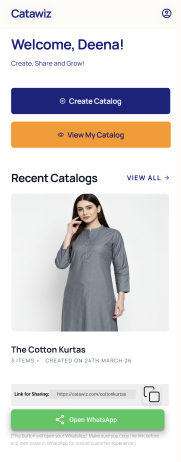
Catawiz turns your product list into a polished, WhatsApp-ready catalog in minutes. Here is the shortest path from zero to your first share.
Step 1: Bulk-upload your products
Drop in your existing product photos and we will line them up for you. You can rename, reorder, and tweak prices in one place — no spreadsheet gymnastics required.

Step 2: Polish the details
- Add a short title and price for each product.
- Group products into catalogs by season, collection, or audience.
- Pick a cover image so your catalog feels on-brand.
Step 3: Share on WhatsApp
One tap copies a link that opens in any browser — no app install needed for your customer. They can reply straight from the same catalog, so every conversation lands in your inbox with context.
I prepare catalogs of 10 products in just under a minute. Share it and get quick replies from clients!
— Nihira Sharma, Ni's Custom Store
Tip: keep iterating
Catalogs are easy to clone. Duplicate last week's release, swap in the new photos, and you have a fresh share-ready link in seconds.